.svg)

New updates in Geometra – read all the news here
New updates in Geometra – read all the news here
We have released two new updates to Geometra with a mix of new features, improvements, and bug fixes.
✨ New features
Choose unit and set decimals
You can now choose which unit each dimension is displayed in — for example, work in millimetres for lengths while keeping square metres for areas. Decimal precision can also be set per dimension. Note: formulas continue to use metres internally, so a 50 mm reduction is still entered as L - 0.050.
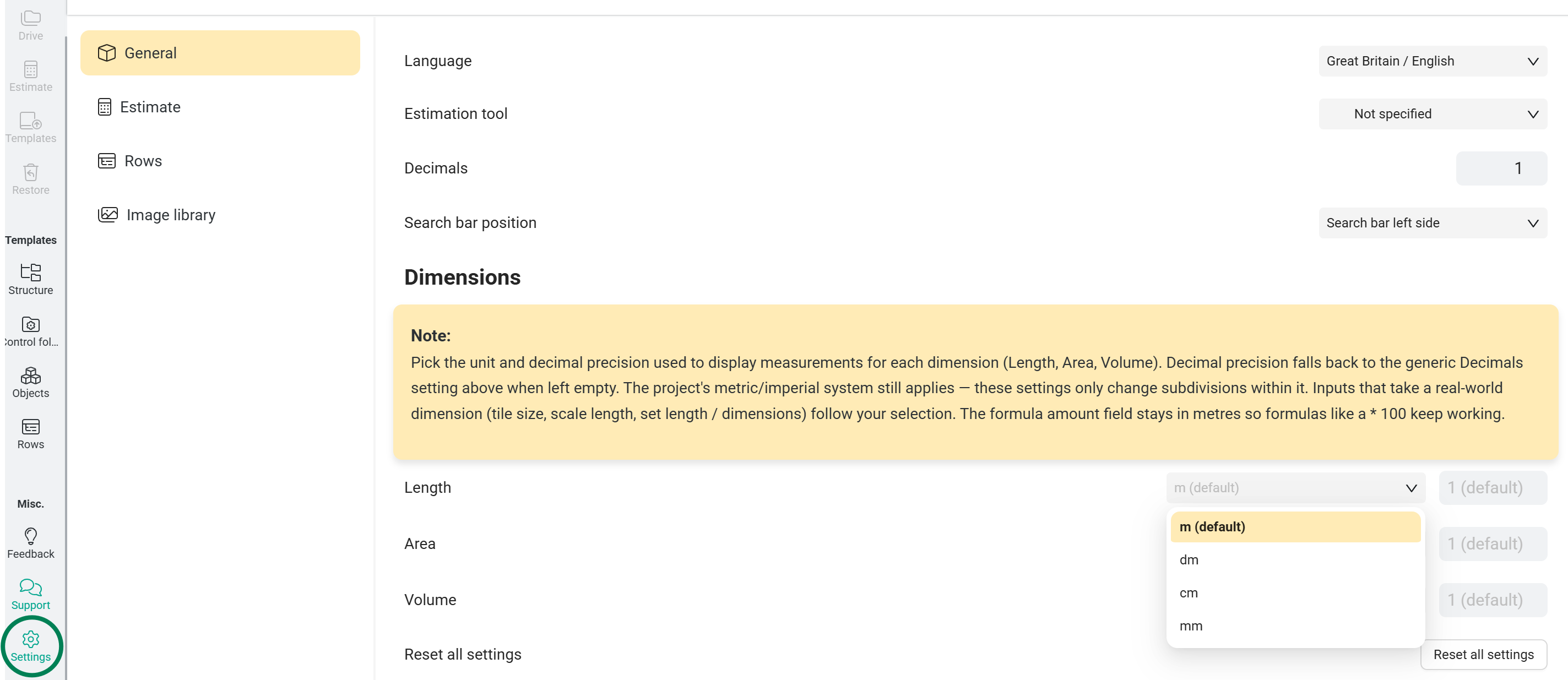
Search bar position
A new option under General Settings → Search bar position lets you place the search field on the left side of the toolbar instead of the right. Applies across Projects, Drive, Calculate, the Restore dialog, and the four Template pages.
Viewers can toggle labels
Users with a Viewer licence can now enable and disable labels on existing objects — useful for opening a project, surfacing the measurements you care about, and reviewing without needing edit rights.
Polish 🇵🇱
Polish is now available as an interface language.
⚙️ Improvements
Reconnect popup
When the server connection drops, a blocking "Reconnecting…" popup now appears. No more clicking around thinking your changes are saving when they aren't.
Memory & performance
Cleaned up several places where event subscriptions weren't being torn down properly. Long working sessions should now consume less RAM and stay snappier over time.
Apply objects to all files
When uploading several drawings at once and one file already has objects, a new "Apply to all files" checkbox lets you choose whether to include objects across the entire batch in one click instead of one file at a time.
Locale source of truth
The list of supported languages is now defined in one place across the app — no more diverging dropdowns showing slightly different options.
Object templates: aspect ratio default
New area object templates no longer ship with aspect ratio locked by default.
Infrastructure: migrated to Hetzner
Behind the scenes we completed the migration from AWS to Hetzner. You shouldn't notice anything other than improved performance.
🐛 Bug fixes
- Multi-tab sessions — fixed an issue where opening a project in a new tab would disconnect the existing session.
- Polygon creation race condition — fixed a startup-timing bug where landing directly into a project could prevent objects from being created (Cannot set properties of undefined (setting 'Polygon')).
- Row autocomplete duplicates — unique rows no longer appear twice in the autocomplete suggestions after being inserted.
- Wall labels not refreshing — fixed a case where label values didn't re-render correctly after toggling section heights.
- Language detection — improved how the app picks your locale. English is the fallback; the next non-English locale is preferred. Fixes a case where Norwegian users weren't being detected correctly (nb/nb-NO/nb-nb mismatch).
- Default row columns — fixed an error that could appear when a user's row-columns-visibility setting was unset.
- Norwegian translation — "Highlight" is now correctly rendered as Marker instead of the previous incorrect string.
- Missing translations — added the missing localisation strings for the "Updates available" prompt.
Thanks to everyone who sent in feedback this cycle — a big chunk of the items above came directly from your reports. Keep them coming.
Geometra update v5.3.1
Improvements
- "Forgot password" is now always available on the login screen and prefills with your last entered email.
- Internal error monitoring filters out unrelated third-party noise so real issues stay visible.
- PDFs that fail to open now report the failure cleanly instead of crashing silently, making problematic files faster to diagnose.
Fixes
- Net value labels on parent objects now update correctly after adding or modifying a Reduction.
- Objects can again be moved into folders via the path dropdown.
- The Comment tool no longer saves the literal text "undefined" instead of your comment.
- The Draggable Toolbar's template submenu now caps its height and scrolls within view rather than overflowing the screen.
- ESC in the name field after placing an object now preserves what you typed and steps you out of placement, instead of clearing the text.
- Annotations placed after the app sat idle in a background tab no longer require a reload to appear — stale connections are now detected on tab return and recover automatically.
- Fixed an underlying race condition behind several recent "annotations didn't show up until reload" reports.
Backend
- Resolved a server-side authentication error triggered by tokens missing a username field.

You can receive news, updates, and customer cases directly in your inbox from us. Fill in your email and choose your language.
.svg)